
Kernel parameters
Add kernel parameters acpi_osi=”!Windows 2009″ and acpi_backlight=vendor.
There is an interesting article at //www.cnpbagwell.com/linux/fedora-13-and-asus-eee-pc-1005peb but the scripts will not work in Fedora 12 with the Eee PC 1001HA model.
The newest 2.6.32.13-120 Fedora kernel optimized for netbooks is available at fedora-netbook.com since the 22nd of May.
Yum Groups
sudo yum groupinstall “Sound and Video” “System Tools” “GNOME Software Development” Fonts “KDE (K Desktop Environment)” “KDE Software Development” “Ukrainian Support” “Russian Support” “Office/Productivity” “Administration Tools” “Authoring and Publishing” “Editors” “Educational Software” “GNOME Desktop Environment” “Games and Entertainment”
E17 (aka Enlightenment)
Enlightenment tested and forsaken because of multiple bugs, both from the official yum repo and Professor Gregory R. Kriehn’s repo . easy17.sh does not build several components because of bugs which were reported back in 2009 and still unfixed. Sad to see the used-to-be friendliest WM in such a state. Do not waste your time.
Plymouth
su -
yum install plymouth-plugin-{fade-throbber,label,space-flares,throbgress,two-step} plymouth-theme-{charge,fade-in,solar,spinfinity} plymouth-utils
plymouth-set-default-theme spinfinity
/usr/libexec/plymouth/plymouth-update-initrd
Plymouth graphical boot rocks.
Virtual Box
Oracle Virtual Box works, I manages to install my licensed copy of Windows Xp on it. However, it is too slow to say it reasonable enough to keep Windows virtual guests for gaming, use double boot instead if you want something sane.
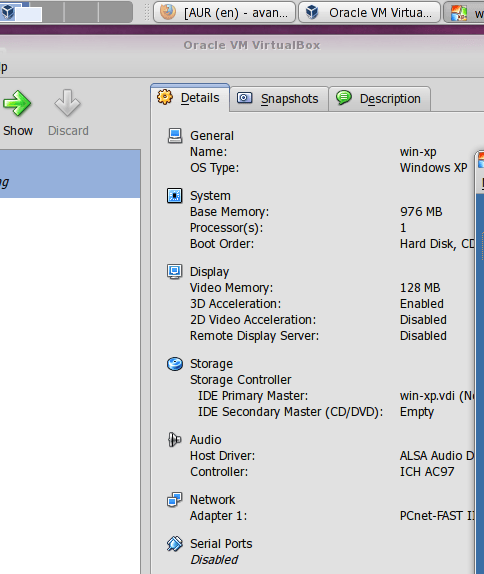
Oracle Virtual Box on Eee PC
Microphone
The problem persists, the internal microphone still does not work, APLA in dmesg reports unrecognised sound card. The external microphone works.
Bluetooth
Now comes the most interesting part, the bluetooth hardware is fully recognized, the service starts and runs without any messages but GNOME and KDE software report the cannot find any hardware. An external bluetooth dongle works.
dmesg

Full dmesg output for those who might be interested
Linux version 2.6.32.13-120.netbook.fc12.i686 (Quasar@Q.Fedora12) (gcc version 4.4.3 20100127 (Red Hat 4.4.3-4) (GCC) ) #1 SMP PREEMPT Fri May 14 13:17:28 EEST 2010
KERNEL supported cpus:
Intel GenuineIntel
AMD AuthenticAMD
NSC Geode by NSC
Cyrix CyrixInstead
Centaur CentaurHauls
Transmeta GenuineTMx86
Transmeta TransmetaCPU
UMC UMC UMC UMC
BIOS-provided physical RAM map:
BIOS-e820: 0000000000000000 – 000000000009fc00 (usable)
BIOS-e820: 000000000009fc00 – 00000000000a0000 (reserved)
BIOS-e820: 00000000000e2000 – 0000000000100000 (reserved)
BIOS-e820: 0000000000100000 – 000000007f7a0000 (usable)
BIOS-e820: 000000007f7a0000 – 000000007f7ae000 (ACPI data)
BIOS-e820: 000000007f7ae000 – 000000007f7f0000 (ACPI NVS)
BIOS-e820: 000000007f7f0000 – 000000007f800000 (reserved)
BIOS-e820: 00000000fee00000 – 00000000fee01000 (reserved)
BIOS-e820: 00000000fff80000 – 0000000100000000 (reserved)
DMI present.
AMI BIOS detected: BIOS may corrupt low RAM, working around it.
e820 update range: 0000000000000000 – 0000000000010000 (usable) ==> (reserved)
last_pfn = 0x7f7a0 max_arch_pfn = 0x100000
MTRR default type: uncachable
MTRR fixed ranges enabled:
00000-9FFFF write-back
A0000-DFFFF uncachable
E0000-EFFFF write-through
F0000-FFFFF write-protect
MTRR variable ranges enabled:
0 base 000000000 mask 080000000 write-back
1 base 07F800000 mask 0FF800000 uncachable
2 disabled
3 disabled
4 disabled
5 disabled
6 disabled
7 disabled
x86 PAT enabled: cpu 0, old 0x7040600070406, new 0x7010600070106
original variable MTRRs
reg 0, base: 0GB, range: 2GB, type WB
reg 1, base: 2040MB, range: 8MB, type UC
total RAM covered: 2040M
Found optimal setting for mtrr clean up
gran_size: 64K chunk_size: 16M num_reg: 2 lose cover RAM: 0G
New variable MTRRs
reg 0, base: 0GB, range: 2GB, type WB
reg 1, base: 2040MB, range: 8MB, type UC
initial memory mapped : 0 – 01800000
init_memory_mapping: 0000000000000000-00000000377fe000
Using x86 segment limits to approximate NX protection
0000000000 – 0000400000 page 4k
0000400000 – 0037400000 page 2M
0037400000 – 00377fe000 page 4k
kernel direct mapping tables up to 377fe000 @ 10000-15000
RAMDISK: 3794d000 – 37fef12a
Allocated new RAMDISK: 00100000 – 007a212a
Move RAMDISK from 000000003794d000 – 0000000037fef129 to 00100000 – 007a2129
ACPI: RSDP 000fb9e0 00014 (v00 ACPIAM)
ACPI: RSDT 7f7a0000 0003C (v01 A_M_I_ OEMRSDT 01001005 MSFT 00000097)
ACPI: FACP 7f7a0200 00084 (v02 A_M_I_ OEMFACP 01001005 MSFT 00000097)
ACPI: DSDT 7f7a0430 080A2 (v01 A1311 A1311000 00000000 INTL 20051117)
ACPI: FACS 7f7ae000 00040
ACPI: APIC 7f7a0390 0005C (v01 A_M_I_ OEMAPIC 01001005 MSFT 00000097)
ACPI: MCFG 7f7a03f0 0003C (v01 A_M_I_ OEMMCFG 01001005 MSFT 00000097)
ACPI: OEMB 7f7ae040 00061 (v01 A_M_I_ AMI_OEM 01001005 MSFT 00000097)
ACPI: HPET 7f7a84e0 00038 (v01 A_M_I_ OEMHPET 01001005 MSFT 00000097)
ACPI: SSDT 7f7aeb80 004F0 (v01 PmRef CpuPm 00003000 INTL 20051117)
ACPI: Local APIC address 0xfee00000
1151MB HIGHMEM available.
887MB LOWMEM available.
mapped low ram: 0 – 377fe000
low ram: 0 – 377fe000
node 0 low ram: 00000000 – 377fe000
node 0 bootmap 00011000 – 00017f00
(9 early reservations) ==> bootmem [0000000000 – 00377fe000]
#0 [0000000000 – 0000001000] BIOS data page ==> [0000000000 – 0000001000]
#1 [0000001000 – 0000002000] EX TRAMPOLINE ==> [0000001000 – 0000002000]
#2 [0000006000 – 0000007000] TRAMPOLINE ==> [0000006000 – 0000007000]
#3 [0001000000 – 00015fcde8] TEXT DATA BSS ==> [0001000000 – 00015fcde8]
#4 [000009fc00 – 0000100000] BIOS reserved ==> [000009fc00 – 0000100000]
#5 [00015fd000 – 00016031e0] BRK ==> [00015fd000 – 00016031e0]
#6 [0000010000 – 0000011000] PGTABLE ==> [0000010000 – 0000011000]
#7 [0000100000 – 00007a212a] NEW RAMDISK ==> [0000100000 – 00007a212a]
#8 [0000011000 – 0000018000] BOOTMAP ==> [0000011000 – 0000018000]
found SMP MP-table at [c00ff780] ff780
Zone PFN ranges:
DMA 0x00000010 -> 0x00001000
Normal 0x00001000 -> 0x000377fe
HighMem 0x000377fe -> 0x0007f7a0
Movable zone start PFN for each node
early_node_map[2] active PFN ranges
0: 0x00000010 -> 0x0000009f
0: 0x00000100 -> 0x0007f7a0
On node 0 totalpages: 522031
free_area_init_node: node 0, pgdat c1518cc0, node_mem_map c1605200
DMA zone: 32 pages used for memmap
DMA zone: 0 pages reserved
DMA zone: 3951 pages, LIFO batch:0
Normal zone: 1744 pages used for memmap
Normal zone: 221486 pages, LIFO batch:31
HighMem zone: 2304 pages used for memmap
HighMem zone: 292514 pages, LIFO batch:31
Using APIC driver default
ACPI: PM-Timer IO Port: 0x808
ACPI: Local APIC address 0xfee00000
ACPI: LAPIC (acpi_id[0x01] lapic_id[0x00] enabled)
ACPI: LAPIC (acpi_id[0x02] lapic_id[0x01] enabled)
ACPI: IOAPIC (id[0x02] address[0xfec00000] gsi_base[0])
IOAPIC[0]: apic_id 2, version 32, address 0xfec00000, GSI 0-23
ACPI: INT_SRC_OVR (bus 0 bus_irq 0 global_irq 2 dfl dfl)
ACPI: INT_SRC_OVR (bus 0 bus_irq 9 global_irq 9 high level)
ACPI: IRQ0 used by override.
ACPI: IRQ2 used by override.
ACPI: IRQ9 used by override.
Using ACPI (MADT) for SMP configuration information
ACPI: HPET id: 0xffffffff base: 0xfed00000
SMP: Allowing 2 CPUs, 0 hotplug CPUs
nr_irqs_gsi: 24
PM: Registered nosave memory: 000000000009f000 – 00000000000a0000
PM: Registered nosave memory: 00000000000a0000 – 00000000000e2000
PM: Registered nosave memory: 00000000000e2000 – 0000000000100000
Allocating PCI resources starting at 7f800000 (gap: 7f800000:7f600000)
NR_CPUS:2 nr_cpumask_bits:2 nr_cpu_ids:2 nr_node_ids:1
PERCPU: Embedded 12 pages/cpu @c2800000 s28312 r0 d20840 u2097152
pcpu-alloc: s28312 r0 d20840 u2097152 alloc=1*4194304
pcpu-alloc: [0] 0 1
Built 1 zonelists in Zone order, mobility grouping on. Total pages: 517951
Kernel command line: ro root=UUID=dd531464-afe1-4014-a431-445d8ddd7ef8 noiswmd LANG=en_US.UTF-8 SYSFONT=latarcyrheb-sun16 KEYBOARDTYPE=pc KEYTABLE=us selinux=0 audit=0 acpi_osi=”!Windows 2009″ acpi_backlight=vendor rhgb quiet
ACPI: Deleted _OSI(Windows 2009)
PID hash table entries: 4096 (order: 2, 16384 bytes)
Dentry cache hash table entries: 131072 (order: 7, 524288 bytes)
Inode-cache hash table entries: 65536 (order: 6, 262144 bytes)
Enabling fast FPU save and restore… done.
Enabling unmasked SIMD FPU exception support… done.
Initializing CPU#0
Initializing HighMem for node 0 (000377fe:0007f7a0)
Memory: 2056856k/2088576k available (3330k kernel code, 30232k reserved, 1922k data, 348k init, 1179272k highmem)
virtual kernel memory layout:
fixmap : 0xfff69000 – 0xfffff000 ( 600 kB)
pkmap : 0xff800000 – 0xffc00000 (4096 kB)
vmalloc : 0xf7ffe000 – 0xff7fe000 ( 120 MB)
lowmem : 0xc0000000 – 0xf77fe000 ( 887 MB)
.init : 0xc1522000 – 0xc1579000 ( 348 kB)
.data : 0xc1340980 – 0xc1521528 (1922 kB)
.text : 0xc1000000 – 0xc1340980 (3330 kB)
Checking if this processor honours the WP bit even in supervisor mode…Ok.
SLUB: Genslabs=13, HWalign=64, Order=0-3, MinObjects=0, CPUs=2, Nodes=1
Hierarchical RCU implementation.
NR_IRQS:320
Console: colour VGA+ 80×25
console [tty0] enabled
hpet clockevent registered
HPET: 3 timers in total, 0 timers will be used for per-cpu timer
Fast TSC calibration using PIT
Detected 1600.092 MHz processor.
Calibrating delay loop (skipped), value calculated using timer frequency.. 3200.18 BogoMIPS (lpj=1600092)
Security Framework initialized
Mount-cache hash table entries: 512
CPU: L1 I cache: 32K, L1 D cache: 24K
CPU: L2 cache: 512K
CPU: Physical Processor ID: 0
CPU: Processor Core ID: 0
mce: CPU supports 5 MCE banks
CPU0: Thermal monitoring enabled (TM2)
using mwait in idle threads.
Checking ‘hlt’ instruction… OK.
ACPI: Core revision 20090903
Enabling APIC mode: Flat. Using 1 I/O APICs
..TIMER: vector=0x30 apic1=0 pin1=2 apic2=-1 pin2=-1
CPU0: Intel(R) Atom(TM) CPU N270 @ 1.60GHz stepping 02
Booting processor 1 APIC 0x1 ip 0x6000
Initializing CPU#1
CPU: L1 I cache: 32K, L1 D cache: 24K
CPU: L2 cache: 512K
CPU: Physical Processor ID: 0
CPU: Processor Core ID: 0
CPU1: Thermal monitoring enabled (TM2)
CPU1: Intel(R) Atom(TM) CPU N270 @ 1.60GHz stepping 02
checking TSC synchronization [CPU#0 -> CPU#1]: passed.
Brought up 2 CPUs
Total of 2 processors activated (6399.70 BogoMIPS).
sizeof(vma)=84 bytes
sizeof(page)=32 bytes
sizeof(inode)=344 bytes
sizeof(dentry)=132 bytes
sizeof(ext3inode)=500 bytes
sizeof(buffer_head)=56 bytes
sizeof(skbuff)=176 bytes
sizeof(task_struct)=3164 bytes
CPU0 attaching sched-domain:
domain 0: span 0-1 level SIBLING
groups: 0 (cpu_power = 589) 1 (cpu_power = 589)
domain 1: span 0-1 level MC
groups: 0-1 (cpu_power = 1178)
CPU1 attaching sched-domain:
domain 0: span 0-1 level SIBLING
groups: 1 (cpu_power = 589) 0 (cpu_power = 589)
domain 1: span 0-1 level MC
groups: 0-1 (cpu_power = 1178)
Time: 11:55:31 Date: 05/23/10
NET: Registered protocol family 16
ACPI: bus type pci registered
PCI: MCFG configuration 0: base e0000000 segment 0 buses 0 – 63
PCI: Not using MMCONFIG.
PCI: PCI BIOS revision 3.00 entry at 0xf0031, last bus=5
PCI: Using configuration type 1 for base access
bio: create slab <bio-0> at 0
ACPI: EC: Look up EC in DSDT
ACPI: BIOS _OSI(Linux) query ignored
ACPI: Executed 2 blocks of module-level executable AML code
ACPI: Interpreter enabled
ACPI: (supports S0 S3 S4 S5)
ACPI: Using IOAPIC for interrupt routing
PCI: MCFG configuration 0: base e0000000 segment 0 buses 0 – 63
PCI: MCFG area at e0000000 reserved in ACPI motherboard resources
PCI: Using MMCONFIG for extended config space
ACPI: EC: GPE = 0x1c, I/O: command/status = 0x66, data = 0x62
ACPI: No dock devices found.
ACPI: PCI Root Bridge [PCI0] (0000:00)
pci 0000:00:02.0: reg 10 32bit mmio: [0xf7e00000-0xf7e7ffff]
pci 0000:00:02.0: reg 14 io port: [0xdc00-0xdc07]
pci 0000:00:02.0: reg 18 32bit mmio pref: [0xd0000000-0xdfffffff]
pci 0000:00:02.0: reg 1c 32bit mmio: [0xf7dc0000-0xf7dfffff]
pci 0000:00:02.1: reg 10 32bit mmio: [0xf7e80000-0xf7efffff]
pci 0000:00:1b.0: reg 10 64bit mmio: [0xf7db8000-0xf7dbbfff]
pci 0000:00:1b.0: PME# supported from D0 D3hot D3cold
pci 0000:00:1b.0: PME# disabled
pci 0000:00:1c.0: PME# supported from D0 D3hot D3cold
pci 0000:00:1c.0: PME# disabled
pci 0000:00:1c.1: PME# supported from D0 D3hot D3cold
pci 0000:00:1c.1: PME# disabled
pci 0000:00:1c.3: PME# supported from D0 D3hot D3cold
pci 0000:00:1c.3: PME# disabled
pci 0000:00:1d.0: reg 20 io port: [0xd400-0xd41f]
pci 0000:00:1d.1: reg 20 io port: [0xd480-0xd49f]
pci 0000:00:1d.2: reg 20 io port: [0xd800-0xd81f]
pci 0000:00:1d.3: reg 20 io port: [0xd880-0xd89f]
pci 0000:00:1d.7: reg 10 32bit mmio: [0xf7db7c00-0xf7db7fff]
pci 0000:00:1d.7: PME# supported from D0 D3hot D3cold
pci 0000:00:1d.7: PME# disabled
pci 0000:00:1f.0: quirk: region 0800-087f claimed by ICH6 ACPI/GPIO/TCO
pci 0000:00:1f.0: quirk: region 0480-04bf claimed by ICH6 GPIO
pci 0000:00:1f.0: ICH7 LPC Generic IO decode 1 PIO at 0380 (mask 0003)
pci 0000:00:1f.0: ICH7 LPC Generic IO decode 2 PIO at 0290 (mask 0007)
pci 0000:00:1f.0: ICH7 LPC Generic IO decode 3 PIO at 0068 (mask 0007)
pci 0000:00:1f.2: reg 10 io port: [0xd080-0xd087]
pci 0000:00:1f.2: reg 14 io port: [0xd000-0xd003]
pci 0000:00:1f.2: reg 18 io port: [0xcc00-0xcc07]
pci 0000:00:1f.2: reg 1c io port: [0xc880-0xc883]
pci 0000:00:1f.2: reg 20 io port: [0xc800-0xc80f]
pci 0000:00:1f.2: reg 24 32bit mmio: [0xf7db7800-0xf7db7bff]
pci 0000:00:1f.2: PME# supported from D3hot
pci 0000:00:1f.2: PME# disabled
pci 0000:02:00.0: reg 10 64bit mmio: [0xfbff0000-0xfbffffff]
pci 0000:02:00.0: supports D1
pci 0000:02:00.0: PME# supported from D0 D1 D3hot D3cold
pci 0000:02:00.0: PME# disabled
pci 0000:00:1c.1: bridge 32bit mmio: [0xf8000000-0xfbffffff]
pci 0000:00:1c.1: bridge 64bit mmio pref: [0xf0000000-0xf6ffffff]
pci 0000:01:00.0: reg 10 64bit mmio: [0xf7fc0000-0xf7ffffff]
pci 0000:01:00.0: reg 18 io port: [0xec00-0xec7f]
pci 0000:01:00.0: PME# supported from D0 D1 D2 D3hot D3cold
pci 0000:01:00.0: PME# disabled
pci 0000:00:1c.3: bridge io port: [0xe000-0xefff]
pci 0000:00:1c.3: bridge 32bit mmio: [0xf7f00000-0xf7ffffff]
pci 0000:00:1e.0: transparent bridge
pci_bus 0000:00: on NUMA node 0
ACPI: PCI Interrupt Routing Table [\_SB_.PCI0._PRT]
ACPI: PCI Interrupt Routing Table [\_SB_.PCI0.P0P5._PRT]
ACPI: PCI Interrupt Routing Table [\_SB_.PCI0.P0P7._PRT]
ACPI: PCI Interrupt Link [LNKA] (IRQs 3 4 5 6 7 10 11 12 14 *15)
ACPI: PCI Interrupt Link [LNKB] (IRQs 3 4 5 6 7 *10 11 12 14 15)
ACPI: PCI Interrupt Link [LNKC] (IRQs 3 4 *5 6 7 10 11 12 14 15)
ACPI: PCI Interrupt Link [LNKD] (IRQs 3 4 5 6 7 10 *11 12 14 15)
ACPI: PCI Interrupt Link [LNKE] (IRQs 3 4 5 6 7 10 11 12 14 15) *0, disabled.
ACPI: PCI Interrupt Link [LNKF] (IRQs 3 4 5 6 7 10 11 12 14 15) *0, disabled.
ACPI: PCI Interrupt Link [LNKG] (IRQs 3 4 5 6 *7 10 11 12 14 15)
ACPI: PCI Interrupt Link [LNKH] (IRQs *3 4 5 6 7 10 11 12 14 15)
vgaarb: device added: PCI:0000:00:02.0,decodes=io+mem,owns=io+mem,locks=none
vgaarb: loaded
SCSI subsystem initialized
libata version 3.00 loaded.
usbcore: registered new interface driver usbfs
usbcore: registered new interface driver hub
usbcore: registered new device driver usb
PCI: Using ACPI for IRQ routing
PCI: old code would have set cacheline size to 32 bytes, but clflush_size = 64
PCI: pci_cache_line_size set to 64 bytes
Bluetooth: Core ver 2.15
NET: Registered protocol family 31
Bluetooth: HCI device and connection manager initialized
Bluetooth: HCI socket layer initialized
cfg80211: Using static regulatory domain info
cfg80211: Regulatory domain: US
(start_freq – end_freq @ bandwidth), (max_antenna_gain, max_eirp)
(2402000 KHz – 2472000 KHz @ 40000 KHz), (600 mBi, 2700 mBm)
(5170000 KHz – 5190000 KHz @ 40000 KHz), (600 mBi, 2300 mBm)
(5190000 KHz – 5210000 KHz @ 40000 KHz), (600 mBi, 2300 mBm)
(5210000 KHz – 5230000 KHz @ 40000 KHz), (600 mBi, 2300 mBm)
(5230000 KHz – 5330000 KHz @ 40000 KHz), (600 mBi, 2300 mBm)
(5735000 KHz – 5835000 KHz @ 40000 KHz), (600 mBi, 3000 mBm)
cfg80211: Calling CRDA for country: US
hpet0: at MMIO 0xfed00000, IRQs 2, 8, 0
hpet0: 3 comparators, 64-bit 14.318180 MHz counter
Switching to clocksource tsc
pnp: PnP ACPI init
ACPI: bus type pnp registered
pnp: PnP ACPI: found 13 devices
ACPI: ACPI bus type pnp unregistered
system 00:01: iomem range 0xfed13000-0xfed19fff has been reserved
system 00:08: ioport range 0x25c-0x25f has been reserved
system 00:08: ioport range 0x380-0x383 has been reserved
system 00:08: ioport range 0x400-0x41f has been reserved
system 00:08: ioport range 0x4d0-0x4d1 has been reserved
system 00:08: ioport range 0x800-0x87f has been reserved
system 00:08: ioport range 0x480-0x4bf has been reserved
system 00:08: iomem range 0x8c000000-0x8c01ffff has been reserved
system 00:08: iomem range 0xfed1c000-0xfed1ffff has been reserved
system 00:08: iomem range 0xfed20000-0xfed3ffff has been reserved
system 00:08: iomem range 0xfed50000-0xfed8ffff has been reserved
system 00:08: iomem range 0xffb00000-0xffbfffff has been reserved
system 00:08: iomem range 0xfff00000-0xffffffff could not be reserved
system 00:0a: iomem range 0xfec00000-0xfec00fff could not be reserved
system 00:0a: iomem range 0xfee00000-0xfee00fff has been reserved
system 00:0b: iomem range 0xe0000000-0xe3ffffff has been reserved
system 00:0c: iomem range 0x0-0x9ffff could not be reserved
system 00:0c: iomem range 0xc0000-0xcffff could not be reserved
system 00:0c: iomem range 0xe0000-0xfffff could not be reserved
system 00:0c: iomem range 0x100000-0x7f7fffff could not be reserved
pci 0000:00:1c.0: PCI bridge, secondary bus 0000:04
pci 0000:00:1c.0: IO window: 0x1000-0x1fff
pci 0000:00:1c.0: MEM window: 0x80000000-0x801fffff
pci 0000:00:1c.0: PREFETCH window: 0x00000080200000-0x000000803fffff
pci 0000:00:1c.1: PCI bridge, secondary bus 0000:02
pci 0000:00:1c.1: IO window: 0x2000-0x2fff
pci 0000:00:1c.1: MEM window: 0xf8000000-0xfbffffff
pci 0000:00:1c.1: PREFETCH window: 0x000000f0000000-0x000000f6ffffff
pci 0000:00:1c.3: PCI bridge, secondary bus 0000:01
pci 0000:00:1c.3: IO window: 0xe000-0xefff
pci 0000:00:1c.3: MEM window: 0xf7f00000-0xf7ffffff
pci 0000:00:1c.3: PREFETCH window: 0x00000080400000-0x000000805fffff
pci 0000:00:1e.0: PCI bridge, secondary bus 0000:05
pci 0000:00:1e.0: IO window: disabled
pci 0000:00:1e.0: MEM window: disabled
pci 0000:00:1e.0: PREFETCH window: disabled
pci 0000:00:1c.0: enabling device (0104 -> 0107)
pci 0000:00:1c.0: PCI INT A -> GSI 16 (level, low) -> IRQ 16
pci 0000:00:1c.0: setting latency timer to 64
pci 0000:00:1c.1: enabling device (0106 -> 0107)
pci 0000:00:1c.1: PCI INT B -> GSI 17 (level, low) -> IRQ 17
pci 0000:00:1c.1: setting latency timer to 64
pci 0000:00:1c.3: PCI INT D -> GSI 19 (level, low) -> IRQ 19
pci 0000:00:1c.3: setting latency timer to 64
pci 0000:00:1e.0: setting latency timer to 64
pci_bus 0000:00: resource 0 io: [0x00-0xffff]
pci_bus 0000:00: resource 1 mem: [0x000000-0xffffffff]
pci_bus 0000:04: resource 0 io: [0x1000-0x1fff]
pci_bus 0000:04: resource 1 mem: [0x80000000-0x801fffff]
pci_bus 0000:04: resource 2 pref mem [0x80200000-0x803fffff]
pci_bus 0000:02: resource 0 io: [0x2000-0x2fff]
pci_bus 0000:02: resource 1 mem: [0xf8000000-0xfbffffff]
pci_bus 0000:02: resource 2 pref mem [0xf0000000-0xf6ffffff]
pci_bus 0000:01: resource 0 io: [0xe000-0xefff]
pci_bus 0000:01: resource 1 mem: [0xf7f00000-0xf7ffffff]
pci_bus 0000:01: resource 2 pref mem [0x80400000-0x805fffff]
pci_bus 0000:05: resource 3 io: [0x00-0xffff]
pci_bus 0000:05: resource 4 mem: [0x000000-0xffffffff]
NET: Registered protocol family 2
IP route cache hash table entries: 32768 (order: 5, 131072 bytes)
TCP established hash table entries: 131072 (order: 8, 1048576 bytes)
TCP bind hash table entries: 65536 (order: 7, 524288 bytes)
TCP: Hash tables configured (established 131072 bind 65536)
TCP reno registered
NET: Registered protocol family 1
pci 0000:00:02.0: Boot video device
Unpacking initramfs…
Freeing initrd memory: 6792k freed
microcode: CPU0 sig=0x106c2, pf=0x4, revision=0x212
microcode: CPU1 sig=0x106c2, pf=0x4, revision=0x212
Microcode Update Driver: v2.00 <tigran@aivazian.fsnet.co.uk>, Peter Oruba
highmem bounce pool size: 64 pages
squashfs: version 4.0 (2009/01/31) Phillip Lougher
msgmni has been set to 1729
alg: No test for stdrng (krng)
Block layer SCSI generic (bsg) driver version 0.4 loaded (major 253)
io scheduler noop registered
io scheduler cfq registered (default)
pcieport 0000:00:1c.0: irq 24 for MSI/MSI-X
pcieport 0000:00:1c.0: setting latency timer to 64
pcieport 0000:00:1c.1: irq 25 for MSI/MSI-X
pcieport 0000:00:1c.1: setting latency timer to 64
pcieport 0000:00:1c.3: irq 26 for MSI/MSI-X
pcieport 0000:00:1c.3: setting latency timer to 64
pci_hotplug: PCI Hot Plug PCI Core version: 0.5
pciehp: PCI Express Hot Plug Controller Driver version: 0.4
acpiphp: ACPI Hot Plug PCI Controller Driver version: 0.5
ACPI: AC Adapter [AC0] (on-line)
input: Lid Switch as /devices/LNXSYSTM:00/LNXSYBUS:00/PNP0C0D:00/input/input0
ACPI: Lid Switch [LID]
input: Sleep Button as /devices/LNXSYSTM:00/LNXSYBUS:00/PNP0C0E:00/input/input1
ACPI: Sleep Button [SLPB]
input: Power Button as /devices/LNXSYSTM:00/LNXSYBUS:00/PNP0C0C:00/input/input2
ACPI: Power Button [PWRB]
input: Power Button as /devices/LNXSYSTM:00/LNXPWRBN:00/input/input3
ACPI: Power Button [PWRF]
input: Video Bus as /devices/LNXSYSTM:00/LNXSYBUS:00/PNP0A08:00/LNXVIDEO:00/input/input4
ACPI: Video Device [VGA] (multi-head: yes rom: no post: no)
ACPI: SSDT 7f7ae180 0023C (v01 PmRef Cpu0Ist 00003000 INTL 20051117)
ACPI: SSDT 7f7ae450 00724 (v01 PmRef Cpu0Cst 00003001 INTL 20051117)
Monitor-Mwait will be used to enter C-1 state
Monitor-Mwait will be used to enter C-2 state
Marking TSC unstable due to TSC halts in idle
Switching to clocksource hpet
processor LNXCPU:00: registered as cooling_device0
ACPI: SSDT 7f7ae0b0 000CC (v01 PmRef Cpu1Ist 00003000 INTL 20051117)
ACPI: SSDT 7f7ae3c0 00085 (v01 PmRef Cpu1Cst 00003000 INTL 20051117)
processor LNXCPU:01: registered as cooling_device1
thermal LNXTHERM:01: registered as thermal_zone0
ACPI: Thermal Zone [TZ00] (60 C)
Linux agpgart interface v0.103
agpgart-intel 0000:00:00.0: Intel 945GME Chipset
agpgart-intel 0000:00:00.0: detected 7932K stolen memory
agpgart-intel 0000:00:00.0: AGP aperture is 256M @ 0xd0000000
[drm] Initialized drm 1.1.0 20060810
Serial: 8250/16550 driver, 4 ports, IRQ sharing disabled
loop: module loaded
ahci 0000:00:1f.2: version 3.0
ahci 0000:00:1f.2: PCI INT B -> GSI 18 (level, low) -> IRQ 18
ahci 0000:00:1f.2: irq 27 for MSI/MSI-X
ahci 0000:00:1f.2: AHCI 0001.0100 32 slots 4 ports 1.5 Gbps 0x1 impl SATA mode
ahci 0000:00:1f.2: flags: 64bit ncq pm led clo pio slum part
ahci 0000:00:1f.2: setting latency timer to 64
scsi0 : ahci
scsi1 : ahci
scsi2 : ahci
scsi3 : ahci
ata1: SATA max UDMA/133 irq_stat 0x00400040, connection status changed irq 27
ata2: DUMMY
ata3: DUMMY
ata4: DUMMY
e100: Intel(R) PRO/100 Network Driver, 3.5.24-k2-NAPI
e100: Copyright(c) 1999-2006 Intel Corporation
Fusion MPT base driver 3.04.12
Copyright (c) 1999-2008 LSI Corporation
Fusion MPT SPI Host driver 3.04.12
ehci_hcd: USB 2.0 ‘Enhanced’ Host Controller (EHCI) Driver
ehci_hcd 0000:00:1d.7: PCI INT A -> GSI 23 (level, low) -> IRQ 23
ehci_hcd 0000:00:1d.7: setting latency timer to 64
ehci_hcd 0000:00:1d.7: EHCI Host Controller
ehci_hcd 0000:00:1d.7: new USB bus registered, assigned bus number 1
ehci_hcd 0000:00:1d.7: using broken periodic workaround
ehci_hcd 0000:00:1d.7: debug port 1
ehci_hcd 0000:00:1d.7: cache line size of 64 is not supported
ehci_hcd 0000:00:1d.7: irq 23, io mem 0xf7db7c00
ehci_hcd 0000:00:1d.7: USB 2.0 started, EHCI 1.00
usb usb1: New USB device found, idVendor=1d6b, idProduct=0002
usb usb1: New USB device strings: Mfr=3, Product=2, SerialNumber=1
usb usb1: Product: EHCI Host Controller
usb usb1: Manufacturer: Linux 2.6.32.13-120.netbook.fc12.i686 ehci_hcd
usb usb1: SerialNumber: 0000:00:1d.7
usb usb1: configuration #1 chosen from 1 choice
hub 1-0:1.0: USB hub found
hub 1-0:1.0: 8 ports detected
ohci_hcd: USB 1.1 ‘Open’ Host Controller (OHCI) Driver
uhci_hcd: USB Universal Host Controller Interface driver
uhci_hcd 0000:00:1d.0: PCI INT A -> GSI 23 (level, low) -> IRQ 23
uhci_hcd 0000:00:1d.0: setting latency timer to 64
uhci_hcd 0000:00:1d.0: UHCI Host Controller
uhci_hcd 0000:00:1d.0: new USB bus registered, assigned bus number 2
uhci_hcd 0000:00:1d.0: irq 23, io base 0x0000d400
usb usb2: New USB device found, idVendor=1d6b, idProduct=0001
usb usb2: New USB device strings: Mfr=3, Product=2, SerialNumber=1
usb usb2: Product: UHCI Host Controller
usb usb2: Manufacturer: Linux 2.6.32.13-120.netbook.fc12.i686 uhci_hcd
usb usb2: SerialNumber: 0000:00:1d.0
usb usb2: configuration #1 chosen from 1 choice
hub 2-0:1.0: USB hub found
hub 2-0:1.0: 2 ports detected
uhci_hcd 0000:00:1d.1: PCI INT B -> GSI 19 (level, low) -> IRQ 19
uhci_hcd 0000:00:1d.1: setting latency timer to 64
uhci_hcd 0000:00:1d.1: UHCI Host Controller
uhci_hcd 0000:00:1d.1: new USB bus registered, assigned bus number 3
uhci_hcd 0000:00:1d.1: irq 19, io base 0x0000d480
usb usb3: New USB device found, idVendor=1d6b, idProduct=0001
usb usb3: New USB device strings: Mfr=3, Product=2, SerialNumber=1
usb usb3: Product: UHCI Host Controller
usb usb3: Manufacturer: Linux 2.6.32.13-120.netbook.fc12.i686 uhci_hcd
usb usb3: SerialNumber: 0000:00:1d.1
usb usb3: configuration #1 chosen from 1 choice
hub 3-0:1.0: USB hub found
hub 3-0:1.0: 2 ports detected
uhci_hcd 0000:00:1d.2: PCI INT C -> GSI 18 (level, low) -> IRQ 18
uhci_hcd 0000:00:1d.2: setting latency timer to 64
uhci_hcd 0000:00:1d.2: UHCI Host Controller
uhci_hcd 0000:00:1d.2: new USB bus registered, assigned bus number 4
uhci_hcd 0000:00:1d.2: irq 18, io base 0x0000d800
usb usb4: New USB device found, idVendor=1d6b, idProduct=0001
usb usb4: New USB device strings: Mfr=3, Product=2, SerialNumber=1
usb usb4: Product: UHCI Host Controller
usb usb4: Manufacturer: Linux 2.6.32.13-120.netbook.fc12.i686 uhci_hcd
usb usb4: SerialNumber: 0000:00:1d.2
usb usb4: configuration #1 chosen from 1 choice
hub 4-0:1.0: USB hub found
hub 4-0:1.0: 2 ports detected
uhci_hcd 0000:00:1d.3: PCI INT D -> GSI 16 (level, low) -> IRQ 16
uhci_hcd 0000:00:1d.3: setting latency timer to 64
uhci_hcd 0000:00:1d.3: UHCI Host Controller
uhci_hcd 0000:00:1d.3: new USB bus registered, assigned bus number 5
uhci_hcd 0000:00:1d.3: irq 16, io base 0x0000d880
usb usb5: New USB device found, idVendor=1d6b, idProduct=0001
usb usb5: New USB device strings: Mfr=3, Product=2, SerialNumber=1
usb usb5: Product: UHCI Host Controller
usb usb5: Manufacturer: Linux 2.6.32.13-120.netbook.fc12.i686 uhci_hcd
usb usb5: SerialNumber: 0000:00:1d.3
usb usb5: configuration #1 chosen from 1 choice
hub 5-0:1.0: USB hub found
hub 5-0:1.0: 2 ports detected
PNP: PS/2 Controller [PNP0303:PS2K,PNP0f13:PS2M] at 0x60,0x64 irq 1,12
serio: i8042 KBD port at 0x60,0x64 irq 1
serio: i8042 AUX port at 0x60,0x64 irq 12
mice: PS/2 mouse device common for all mice
rtc_cmos 00:03: RTC can wake from S4
rtc_cmos 00:03: rtc core: registered rtc_cmos as rtc0
rtc0: alarms up to one month, 114 bytes nvram, hpet irqs
device-mapper: uevent: version 1.0.3
device-mapper: ioctl: 4.15.0-ioctl (2009-04-01) initialised: dm-devel@redhat.com
Bluetooth: Generic Bluetooth USB driver ver 0.6
usbcore: registered new interface driver btusb
cpuidle: using governor ladder
cpuidle: using governor menu
sdhci: Secure Digital Host Controller Interface driver
sdhci: Copyright(c) Pierre Ossman
usbcore: registered new interface driver hiddev
usbcore: registered new interface driver usbhid
usbhid: v2.6:USB HID core driver
Advanced Linux Sound Architecture Driver Version 1.0.21.
ALSA device list:
No soundcards found.
nf_conntrack version 0.5.0 (16384 buckets, 65536 max)
CONFIG_NF_CT_ACCT is deprecated and will be removed soon. Please use
nf_conntrack.acct=1 kernel parameter, acct=1 nf_conntrack module option or
sysctl net.netfilter.nf_conntrack_acct=1 to enable it.
ip_tables: (C) 2000-2006 Netfilter Core Team
TCP cubic registered
Initializing XFRM netlink socket
NET: Registered protocol family 17
Bridge firewalling registered
Bluetooth: L2CAP ver 2.14
Bluetooth: L2CAP socket layer initialized
Bluetooth: SCO (Voice Link) ver 0.6
Bluetooth: SCO socket layer initialized
Bluetooth: RFCOMM TTY layer initialized
Bluetooth: RFCOMM socket layer initialized
Bluetooth: RFCOMM ver 1.11
Bluetooth: BNEP (Ethernet Emulation) ver 1.3
Bluetooth: BNEP filters: protocol multicast
802.1Q VLAN Support v1.8 Ben Greear <greearb@candelatech.com>
All bugs added by David S. Miller <davem@redhat.com>
Using IPI No-Shortcut mode
PM: Resume from disk failed.
registered taskstats version 1
Magic number: 10:777:934
input: AT Translated Set 2 keyboard as /devices/platform/i8042/serio0/input/input5
usb 1-2: new high speed USB device using ehci_hcd and address 2
usb 1-2: New USB device found, idVendor=13d3, idProduct=5071
usb 1-2: New USB device strings: Mfr=2, Product=3, SerialNumber=0
usb 1-2: Product: USB2.0 UVC 1.3M WebCam
usb 1-2: Manufacturer: GenesysLogic Technology Co. III, Ltd.
usb 1-2: configuration #1 chosen from 1 choice
ata1: SATA link up 1.5 Gbps (SStatus 113 SControl 300)
ata1.00: ACPI cmd f5/00:00:00:00:00:a0 (SECURITY FREEZE LOCK) filtered out
ata1.00: ATA-8: ST9160301AS, 0001SDM2, max UDMA/133
ata1.00: 312581808 sectors, multi 16: LBA48 NCQ (depth 31/32)
usb 4-1: new low speed USB device using uhci_hcd and address 2
ata1.00: ACPI cmd f5/00:00:00:00:00:a0 (SECURITY FREEZE LOCK) filtered out
ata1.00: configured for UDMA/133
scsi 0:0:0:0: Direct-Access ATA ST9160301AS 0001 PQ: 0 ANSI: 5
sd 0:0:0:0: [sda] 312581808 512-byte logical blocks: (160 GB/149 GiB)
sd 0:0:0:0: Attached scsi generic sg0 type 0
sd 0:0:0:0: [sda] Write Protect is off
sd 0:0:0:0: [sda] Mode Sense: 00 3a 00 00
sd 0:0:0:0: [sda] Write cache: enabled, read cache: enabled, doesn’t support DPO or FUA
sda: sda1 sda2 sda3 sda4 < sda5 >
sd 0:0:0:0: [sda] Attached SCSI disk
Freeing unused kernel memory: 348k freed
Write protecting the kernel text: 3332k
Write protecting the kernel read-only data: 1612k
dracut: dracut-005-2.fc12
udev: starting version 145
usb 4-1: New USB device found, idVendor=04d9, idProduct=0461
usb 4-1: New USB device strings: Mfr=0, Product=0, SerialNumber=0
usb 4-1: configuration #1 chosen from 1 choice
Synaptics Touchpad, model: 1, fw: 7.2, id: 0x1a0b1, caps: 0xd04731/0xa40000
i915 0000:00:02.0: PCI INT A -> GSI 16 (level, low) -> IRQ 16
i915 0000:00:02.0: setting latency timer to 64
input: HID 04d9:0461 as /devices/pci0000:00/0000:00:1d.2/usb4/4-1/4-1:1.0/input/input6
[drm] set up 7M of stolen space
generic-usb 0003:04D9:0461.0001: input,hidraw0: USB HID v1.10 Mouse [HID 04d9:0461] on usb-0000:00:1d.2-1/input0
input: SynPS/2 Synaptics TouchPad as /devices/platform/i8042/serio1/input/input7
composite sync not supported
[drm] initialized overlay support
composite sync not supported
fbcon: inteldrmfb (fb0) is primary device
Console: switching to colour frame buffer device 128×37
fb0: inteldrmfb frame buffer device
registered panic notifier
[drm] Initialized i915 1.6.0 20080730 for 0000:00:02.0 on minor 0
dracut: Starting plymouth daemon
composite sync not supported
dracut: rd_NO_MDIMSM: no MD RAID for imsm/isw raids
EXT4-fs (sda2): mounted filesystem with ordered data mode
dracut: Remounting /dev/disk/by-uuid/dd531464-afe1-4014-a431-445d8ddd7ef8 with -o noatime,ro
EXT4-fs (sda2): mounted filesystem with ordered data mode
dracut: Mounted root filesystem /dev/sda2
dracut: Loading SELinux policy
dracut: /sbin/load_policy: Can’t load policy: No such device
dracut: Switching root
udev: starting version 145
eeepc_laptop: Eee PC Hotkey Driver
eeepc_laptop: Hotkey init flags 0x41
eeepc_laptop: TYPE (2000000) not reported by BIOS, enabling anyway
eeepc_laptop: PANELPOWER (4000000) not reported by BIOS, enabling anyway
eeepc_laptop: TPD (8000000) not reported by BIOS, enabling anyway
eeepc_laptop: Get control methods supported: 0xe101711
input: Asus EeePC extra buttons as /devices/platform/eeepc/input/input8
atl1c 0000:01:00.0: PCI INT A -> GSI 19 (level, low) -> IRQ 19
atl1c 0000:01:00.0: setting latency timer to 64
ACPI: Battery Slot [BAT0] (battery present)
atl1c 0000:01:00.0: version 1.0.0.1-NAPI
HDA Intel 0000:00:1b.0: PCI INT A -> GSI 22 (level, low) -> IRQ 22
HDA Intel 0000:00:1b.0: setting latency timer to 64
Linux video capture interface: v2.00
ath9k 0000:02:00.0: PCI INT A -> GSI 17 (level, low) -> IRQ 17
ath9k 0000:02:00.0: setting latency timer to 64
ath: EEPROM regdomain: 0x8283
ath: EEPROM indicates we should expect a country code
ath: doing EEPROM country->regdmn map search
ath: country maps to regdmn code: 0x3
ath: Country alpha2 being used: RU
ath: Regpair used: 0x3
hda_codec: ALC269: BIOS auto-probing.
ALSA sound/pci/hda/hda_codec.c:3881: autoconfig: line_outs=1 (0x14/0x0/0x0/0x0/0x0)
ALSA sound/pci/hda/hda_codec.c:3885: speaker_outs=0 (0x0/0x0/0x0/0x0/0x0)
ALSA sound/pci/hda/hda_codec.c:3889: hp_outs=1 (0x15/0x0/0x0/0x0/0x0)
ALSA sound/pci/hda/hda_codec.c:3890: mono: mono_out=0x0
ALSA sound/pci/hda/hda_codec.c:3901: inputs: mic=0x12, fmic=0x18, line=0x0, fline=0x0, cd=0x0, aux=0x0
ALSA sound/pci/hda/patch_realtek.c:1288: realtek: No valid SSID, checking pincfg 0x4005822d for NID 0x1d
ALSA sound/pci/hda/patch_realtek.c:1304: realtek: Enabling init ASM_ID=0x822d CODEC_ID=10ec0269
phy0: Selected rate control algorithm ‘ath9k_rate_control’
Registered led device: ath9k-phy0::radio
Registered led device: ath9k-phy0::assoc
Registered led device: ath9k-phy0::tx
Registered led device: ath9k-phy0::rx
phy0: Atheros AR9285 MAC/BB Rev:2 AR5133 RF Rev:e0: mem=0xf8920000, irq=17
cfg80211: Calling CRDA for country: RU
uvcvideo: Found UVC 1.00 device USB2.0 UVC 1.3M WebCam (13d3:5071)
input: USB2.0 UVC 1.3M WebCam as /devices/pci0000:00/0000:00:1d.7/usb1/1-2/1-2:1.0/input/input9
usbcore: registered new interface driver uvcvideo
USB Video Class driver (v0.1.0)
cfg80211: Regulatory domain changed to country: RU
(start_freq – end_freq @ bandwidth), (max_antenna_gain, max_eirp)
(2402000 KHz – 2482000 KHz @ 40000 KHz), (N/A, 2000 mBm)
device-mapper: multipath: version 1.1.0 loaded
EXT4-fs (sda1): mounted filesystem with ordered data mode
EXT4-fs (sda5): mounted filesystem with ordered data mode
Adding 4194296k swap on /dev/sda3. Priority:-1 extents:1 across:4194296k
atl1c 0000:01:00.0: irq 28 for MSI/MSI-X
vboxdrv: Trying to deactivate the NMI watchdog permanently…
vboxdrv: Successfully done.
vboxdrv: Found 2 processor cores.
vboxdrv: fAsync=0 offMin=0x1bc offMax=0x73a4
vboxdrv: TSC mode is ‘synchronous’, kernel timer mode is ‘normal’.
vboxdrv: Successfully loaded version 3.2.0 (interface 0x00140001).
[drm:drm_mode_rmfb] *ERROR* tried to remove a fb that we didn’t own
composite sync not supported
composite sync not supported
composite sync not supported
CPU0 attaching NULL sched-domain.
CPU1 attaching NULL sched-domain.
CPU0 attaching sched-domain:
domain 0: span 0-1 level SIBLING
groups: 0 (cpu_power = 589) 1 (cpu_power = 589)
domain 1: span 0-1 level MC
groups: 0-1 (cpu_power = 1178)
CPU1 attaching sched-domain:
domain 0: span 0-1 level SIBLING
groups: 1 (cpu_power = 589) 0 (cpu_power = 589)
domain 1: span 0-1 level MC
groups: 0-1 (cpu_power = 1178)
composite sync not supported
composite sync not supported
composite sync not supported
fuse init (API version 7.13)
wlan0: deauthenticating from 00:13:49:e1:d1:22 by local choice (reason=3)
wlan0: direct probe to AP 00:13:49:e1:d1:22 (try 1)
wlan0: direct probe responded
wlan0: authenticate with AP 00:13:49:e1:d1:22 (try 1)
wlan0: authenticated
wlan0: associate with AP 00:13:49:e1:d1:22 (try 1)
wlan0: RX AssocResp from 00:13:49:e1:d1:22 (capab=0x411 status=0 aid=2)
wlan0: associated
composite sync not supported
Compositing
Works out of the box, just install all components from the official repo (do not forget the fusion-icon package if you want more control over it).
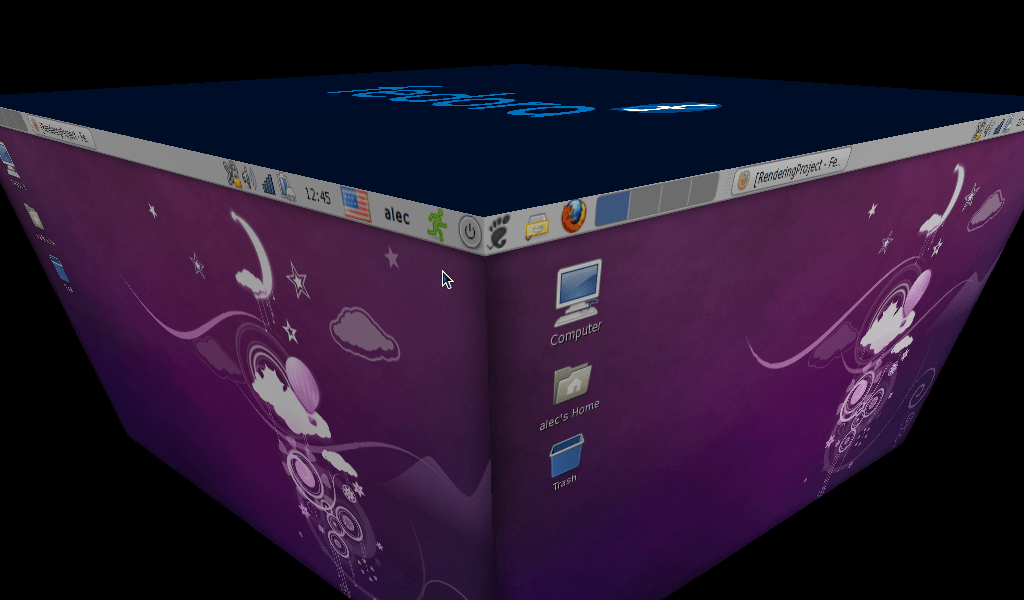
Compoziting in Eee PC, Fedora 12, GNOME
AWN
Works satisfactory after compositing is enabled.
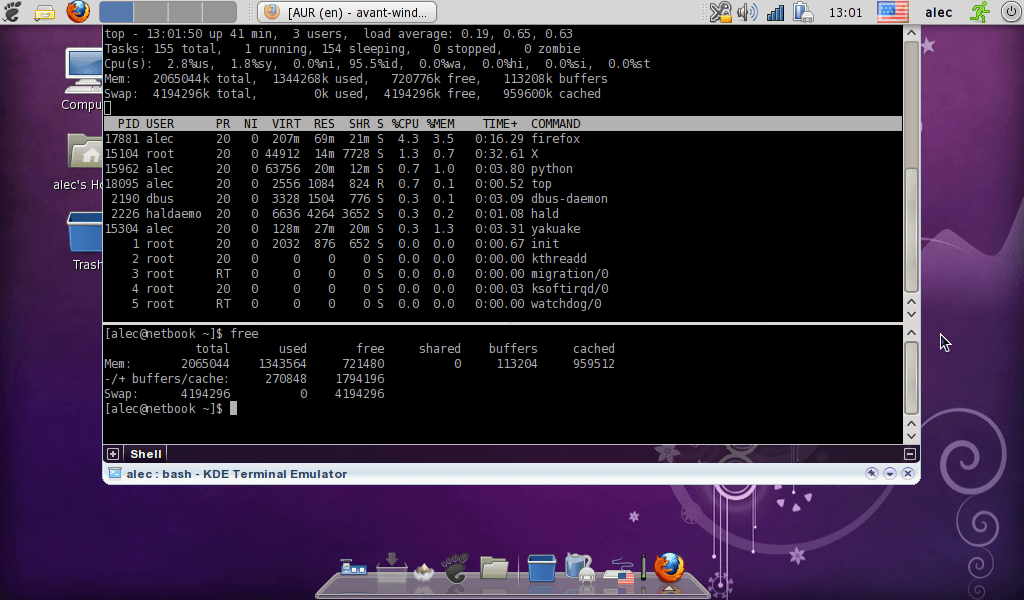
Running avant window navigator with compoziting on Eee PC
GNOME without panels
The bottom panel can be closed from the right-click menu. To close the top one, run gconf-editor and delete “gnome-panel” entry as shown at the picture below. The top panel disappears after X restart.
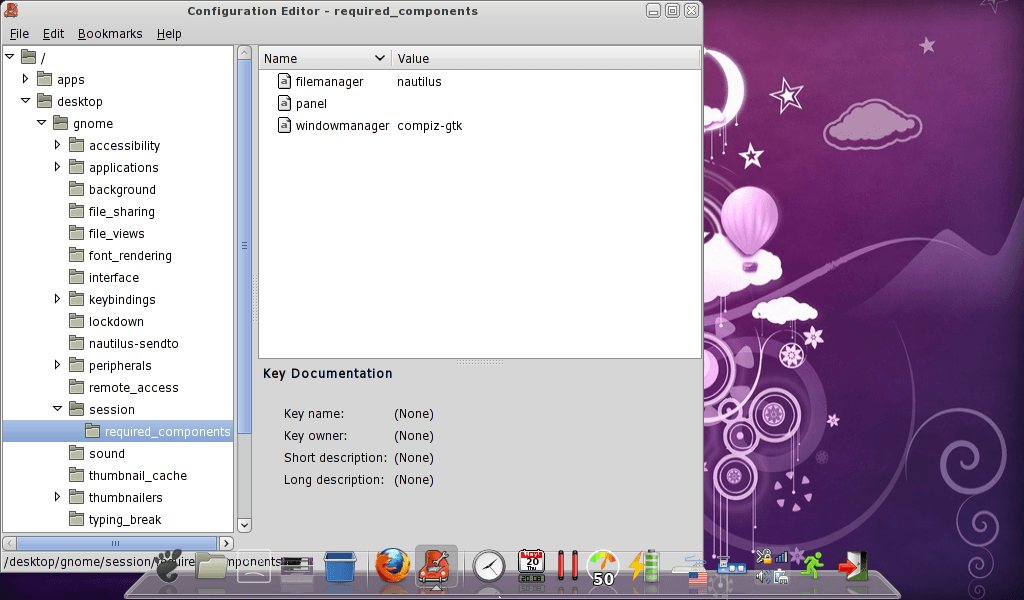
How to get rid of gnome panel
Final look of my desktop
GNOME without panels, conky, compositing, awn
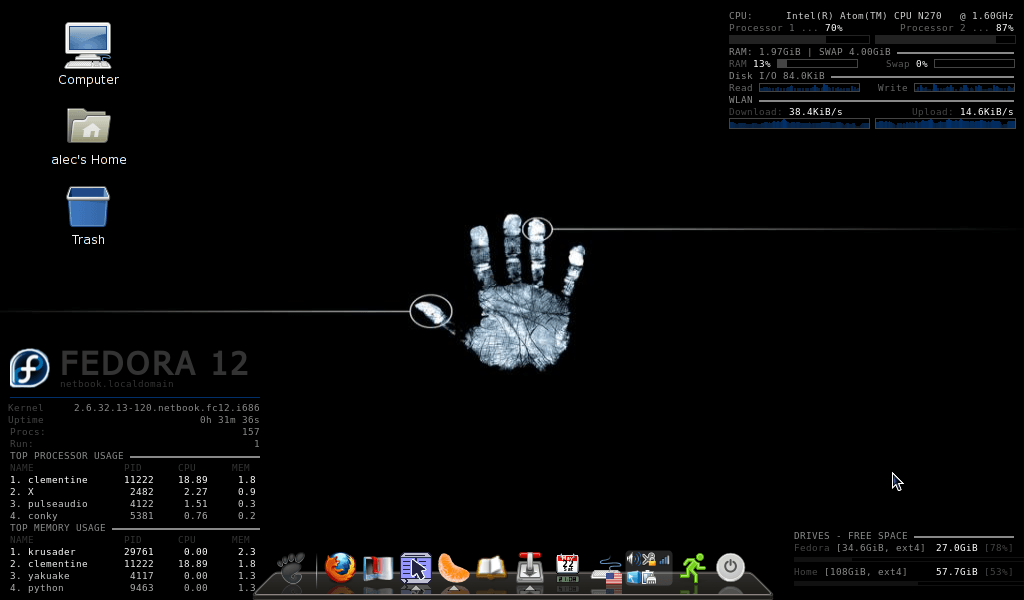
Final look of the Eee PC desktop: GNOME, compiz, conky, awn
Stay tuned for more next week, secure ssh connections on home network, custom grub image, my conky config and other hacks are coming up.